Installing Magus
magus is the way in.
Why not just use Claude Code
Claude Code can add a marketplace and enable plugins on its own. For one person, on one machine, on one project, that is fine — and it is what magus drives underneath.
It stops being fine in three places.
A team can't share it. You can commit the list of plugins. You cannot commit the things those plugins need to actually run: the binaries an MCP server shells out to, CLI tools, skills, the environment variables it wants. A new teammate clones the repo, opens Claude Code, and gets a plugin that loads and then fails on a missing binary. Somebody walks them through it. Then the next person joins.
Updates don't converge. Plugins are installed per project. Update one project and the others stay where they were, with no single place that tells you which version each is on. Two projects on the same plugin at different versions is the normal state, not an accident, and nothing surfaces it.
When it breaks, there is nothing to look at. The state lives across several files Claude
Code owns — a marketplace registry, an installed-plugins registry, enabledPlugins at two
scopes, and a content cache. When a hook stops firing or a plugin quietly does not load, the
fault is in one of those and you get no error saying which.
magus answers all three: one committed manifest that installs everything a plugin needs, one command that reports and repairs the state, and updates you can see across projects.
1. Install magus
bun add -g magus-cli
npm works too:
npm install -g magus-cli
You get a self-contained binary for your platform. On a platform with no prebuilt binary the launcher runs from source under Bun, so the install still works.
Update through magus, not your package manager:
magus upgrade
Two verbs, the same split every package manager uses. magus upgrade advances
magus itself. magus update advances your dependencies — it installs
whatever your active profile declares but this machine is missing, and moves every
"latest" plugin, CLI tool and skill to its newest published version.
magus update           # install what's missing, advance what's behind
magus update --check   # report only; exits 1 if anything is out of date
2. Pick your path
Two ways to use it, and they answer different questions.
Solo — the TUI
magus
That is the whole thing. magus with no arguments opens the interactive TUI: toggle
plugins, MCP servers and skills on this machine, see what each one needs, and install the
binaries it depends on.
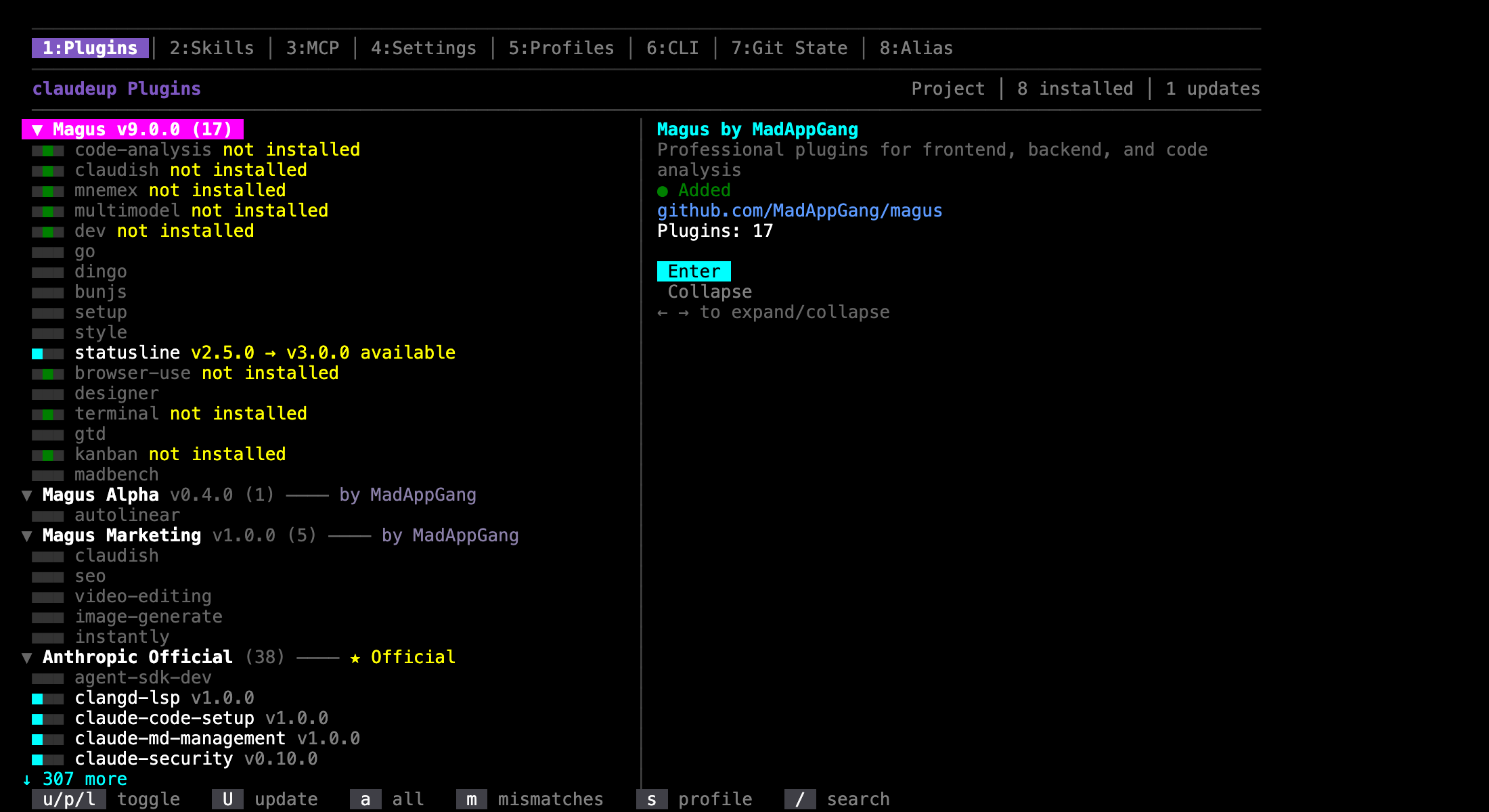
The Magus marketplaces are listed even before you add them. Select one and confirm, and
magus clones and registers it for you. Press n for the same menu, or to be pointed at
the terminal command for a marketplace it does not know about.
Numbers switch tabs: 1 Plugins, 2 Skills, 3 MCP, 4 Settings, 5 Profiles, 6 CLI,
7 Git State, 8 Alias. u/p/l toggle a plugin at user, project or local scope, U
updates one, / searches.
A team — a committed manifest
Write .claude/profiles.json once, commit it, and every teammate runs one command:
git clone <repo> && cd <repo>
magus install
That registers the marketplaces, installs the pinned plugins, installs the binaries those plugins declare, installs the skills, prompts for any required environment variables, and activates the profile.
A plugin id already names its marketplace — dev@magus, image@magus-marketing — so
magus registers the ones it recognises without you declaring them. Declare a
marketplaces block only for a marketplace magus does not ship with, or to point a name
at a fork.
See Teams and profiles for the manifest format and how switching works.
3. Add the statusline
The statusline comes from the setup plugin. Enable
setup@magus, then:
/setup:statusline-install
You get the worktree you are in, your plan limits, and the countdown to reset, along the bottom of Claude Code. Install it per project or globally.
/setup:statusline-customize    sections, theme, bar widths
/setup:statusline-uninstall
While you are there, /setup:project investigates the repository and provisions it, and
/setup:index-skills tells you what your installed skills cost you on every turn.
Without magus
If you want the manual path anyway, Claude Code does the marketplace and plugin steps itself. Inside a session:
/plugin marketplace add MadAppGang/magus
Then turn plugins on with /plugin, or list them in your project's .claude/settings.json
under enabledPlugins. Plugin IDs carry their marketplace, so qualify them —
dev@magus, image@magus-marketing.
You are then on your own for everything around the plugin: binaries, CLI tools, skills, environment variables, and reproducing any of it on a second machine.
Checking a setup
magus doctor          # binary deps, the active profile, conventions
magus doctor --fix    # repair what it can
doctor exits non-zero when it finds a problem, so it works as a CI check. So does
magus install --check, which reports plugins whose installed version differs from the pin
without writing anything.
Which marketplace
You are not limited to Magus. magus knows about several out of the box and lists them before you have added anything, so you can browse first and install second.
| Marketplace | What's in it |
|---|---|
| Magus | Development plugins — see Plugins |
| Magus Marketing | SEO, cold email, image generation, video editing |
| Magus Alpha | Experimental. Interfaces change, plugins get withdrawn |
| Anthropic Official | Anthropic's own plugins |
| 3rd Party | Plugins by other people, accepted into Anthropic's official directory |
| Superpowers | A curated community collection |
Anthropic Official and 3rd Party are the same upstream directory. magus splits them into two lists by who wrote each plugin, so "Anthropic ships this" and "Anthropic accepted this" are not the same badge.
The marketplaces are independent. Adding one does not give you the others.
Your own
Add any marketplace magus does not ship with — your team's, or a fork. Press n in the
TUI, or name it in your profile manifest:
{
  "marketplaces": {
    "acme": { "source": "github", "repo": "acme/claude-plugins" }
  }
}
Then teammates get it from magus install like everything else. See
Teams and profiles.
Next
- Plugins — what each marketplace carries
- Teams and profiles — share one setup across a team
- Advanced Usage — global installs, version pinning, updates
- Troubleshooting — when a plugin does not load