Teams and profiles
Enabling the same plugins on two machines does not give you the same setup. A plugin can declare binaries its MCP server shells out to, CLI tools, skills, and environment variables. Miss one and the plugin loads, shows up in the list, and silently does nothing.
A profile is the whole closure written down: marketplaces, pinned plugins, MCP servers, CLI tools, skills, settings, and which environment variables are required. Commit it, and a teammate reproduces your setup with one command.
Making one
You don't write the file. You set the project up the way you want it, and magus writes down what you did.
1. Get the project right. Open magus, go to the Plugins tab (1), and toggle on what
this project needs. Add MCP servers (3) and skills (2) the same way.
magus
Or start from a preset instead of from scratch. The Profiles tab (5) ships seven, and each
one shows you everything it would install before you apply it.
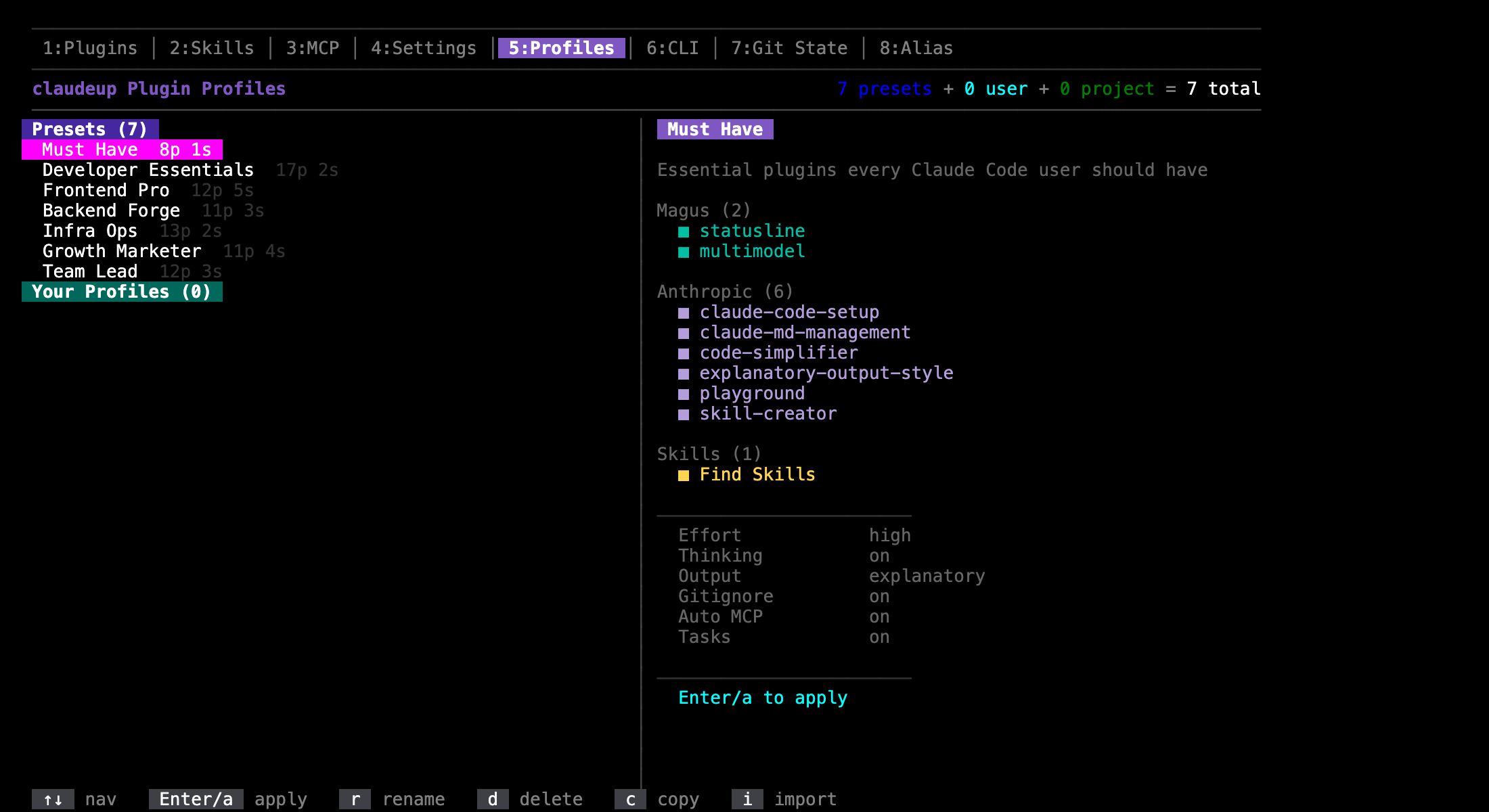
2. Save it as a profile. Press s on the Plugins tab. Name it, and choose the scope:
| Scope | File | For |
|---|---|---|
| Project | .claude/profiles.json | The team. This is the one you commit |
| User | ~/.claude/profiles.json | Just you, on this machine, everywhere |
3. Commit it.
git add .claude/profiles.json && git commit -m "chore: declare the team profile"
The one command
Everyone else, forever after:
git clone <repo> && cd <repo>
magus install
That registers the marketplaces, installs the pinned plugins, installs the binaries those plugins declare plus the profile's CLI tools, installs the skills, prompts for any required environment variables, and activates the profile.
Not installed magus yet? See Installing Magus.
Switching
magus profile list
magus profile switch backend
Or the Profiles tab, where Enter applies one. Switching renders the chosen profile's
settings into this project's config files, which are gitignored, so it leaves no git diff.
What is committed, and what is not
Only the manifest. Everything else is generated, like node_modules.
| Path | Committed | Written by |
|---|---|---|
.claude/profiles.json | yes — the one source of truth | magus, when you save a profile or change the live config |
.claude/profiles/active.json | no, gitignored | magus — which profile is active |
.claude/settings.json | no, gitignored | generated from the active profile |
.mcp.json | no, gitignored | generated from the active profile |
.claude/models.json | no, gitignored | generated from the active profile's model routing |
.claude/skills/<name>/ | per folder | the active profile's skills are installed and gitignored one folder each; any other folder is your own and stays committed |
.claude/settings.local.json | no, gitignored | you — credentials live here |
Because the config files are generated, one developer on frontend and another on backend
produce no git diff between them. magus install and magus profile switch add the
generated paths to .gitignore for you.
If one of them was committed before, a .gitignore line does not untrack it. magus writes it
anyway and asks about it: every time you open magus, the gitignore question names the file as
one that should be ignored, and its first choice stops tracking it for you (staged, for you to
commit). The CLI prints a warning with the fix — git rm --cached <path>, then commit — and
never runs git itself.
A plugin that needs other plugins to load (its dependencies) gets them: a profile enables
what its plugins depend on even when another profile lists them, without writing them into
.claude/profiles.json.
What ends up in the file
magus writes it, so you mostly read it in a diff — and it edits the file rather than re-writing it: only the values that changed move, and your formatting, key order and inline arrays stay as they were. A profile looks like this:
{
  "profiles": {
    "frontend": {
      "extends": "developer-essentials",
      "plugins": { "dev@magus": "latest", "terminal@magus": "4.1.4" },
      "env": { "required": ["FIGMA_ACCESS_TOKEN"] }
    }
  }
}
A profile can also carry mcpServers, cliTools, skills, settings, and a
marketplaces block. Each maps to a tab in the TUI, so you get them by turning things on
there rather than by typing them.
Three things are worth knowing when you read a diff:
extends starts from a built-in profile and overrides it — must-have,
developer-essentials, frontend-pro, backend-forge, infra-ops, growth-marketer,
team-lead. A one-line profile that only sets extends is a working profile.
marketplaces is usually absent, and that is correct. A plugin id already names its
marketplace — dev@magus — and magus registers the ones it ships with. The block only
appears for a marketplace it does not know, or to point a name at a fork.
env names variables, never values. magus install prompts for them and writes them
to .claude/settings.local.json, which is personal and gitignored. Credentials never enter
the manifest.
Set "strictVersions": true at the top level to make install --check fail on any version
drift, rather than reporting it.
Binaries come with the plugin
A plugin declares the binaries it needs in its own plugin.json, and magus resolves them
transitively. This is the part that plain plugin installation cannot do.
$ magus profile show backend
Profile: backend (Backend)
  marketplaces  magus
  plugins       terminal@magus
  cli tools     tmux-mcp@v1.6.3, tmux
A dangling binary counts as missing. which reports a symlink's own path even when its
target is gone, so magus follows the link and checks executability rather than trusting
which.
More than one profile per repo
magus install              # install every profile's plugins, keep (or pick) the active one
magus profile list         # ● marks the active one
magus profile switch backend
magus profile show backend
switch writes the chosen profile's settings, MCP servers and model routing into this
project's config files, installs its skills, and verifies its binaries are present, warning
rather than failing if any are missing.
Switching is exclusive. The generated settings.json names every plugin in
the manifest — its own as true, everyone else's as false — so switching to backend
actively disables the frontend plugins instead of leaving both sets on.
Changes you make outside magus
If you use magus, magus owns the profile. A plugin you install with
claude plugin install --scope project, a setting you change with /config, an MCP server
you add with claude mcp add --scope project — each is a change to the active profile.
The next time you run magus (any command that touches profiles, or the TUI), it records the
change in .claude/profiles.json and prints one line for it:
Added code-search@magus to profile "frontend"
Nothing is set aside or backed up. Review the diff and commit .claude/profiles.json when you
want the team to have it; revert the line if you were only trying something.
It works the other way too. When a teammate's change to .claude/profiles.json arrives with
git pull, the next magus command regenerates your config from it — also when the change
was to another profile but alters yours. If you had changed something locally in the
meantime, both survive.
Editing a skill magus installed makes it yours: magus stops managing it, removes it from the profile, and tells you to commit it as a custom skill.
magus install, magus update and the TUI's update key finish by checking that Claude Code
will load the version they just installed. Other checkouts of the same repository can leave
records that make it load an older one; when that happens magus moves them forward in the same
run and says so, or reports the plugin as failed if it cannot.
Keeping CI honest
magus install --check
Reports plugins whose installed version differs from the pin, and writes nothing. With
"strictVersions": true such a mismatch fails the check. magus doctor also exits non-zero on a problem.
Skills you commit
.claude/skills/ stays a normal directory. Skills you commit there are yours: magus never
moves, copies, backs up or deletes them, in any profile, and they stay tracked by git. Only
the skills a profile lists are installed by magus, each in its own gitignored folder.
If a profile lists a skill whose folder name is already taken by one of yours, magus refuses to switch to it and names both, so you can rename one.
A project set up by an earlier magus release, where the settings files and .claude/skills
were links into the profile, is converted automatically the next time you run magus. What
Claude Code added through those links — a plugin, a permission rule, an MCP server — is added
to the profile first. Where the old files and .claude/profiles.json disagree, the profiles
file's value is kept and magus names the key; a removal made under the old layout is not
applied. Any committed skill the old layout had moved out of the way is put back, and the old
.claude/_profiles/ directory, with the older copies, is kept in .claude/.magus-backups/
rather than deleted. magus doctor without --fix only reports that a conversion is due.